
Download Stock Pro – Interactive Stock Ticker, Real‑Time Alerts & Market Heat Map
Overview
Stock Pro is a sleek, menu‑bar add‑on that transforms the way investors monitor their portfolios. By placing an interactive stock ticker directly on your desktop, Stock Pro lets you view live quotes, glance at performance graphs, and receive instant alerts—all without opening a separate browser window or trading platform. The tool supports more than 170 currencies, so global investors can track foreign‑exchange‑denominated assets without conversion headaches.
A built‑in RSS feed condenses the latest financial headlines into clickable links, delivering market news in a non‑intrusive manner. What truly sets Stock Pro apart is its “heat” feature, which highlights top‑performing securities with a warm color overlay, instantly drawing your eye to the stocks that matter most. Whether you’re a day trader who needs split‑second updates or a long‑term investor who wants periodic portfolio snapshots, Stock Pro offers a secure, lightweight solution that lives quietly in the background while staying ready to shout when the market moves.
Key Features
- Live, scrollable ticker bar with customizable watchlists.
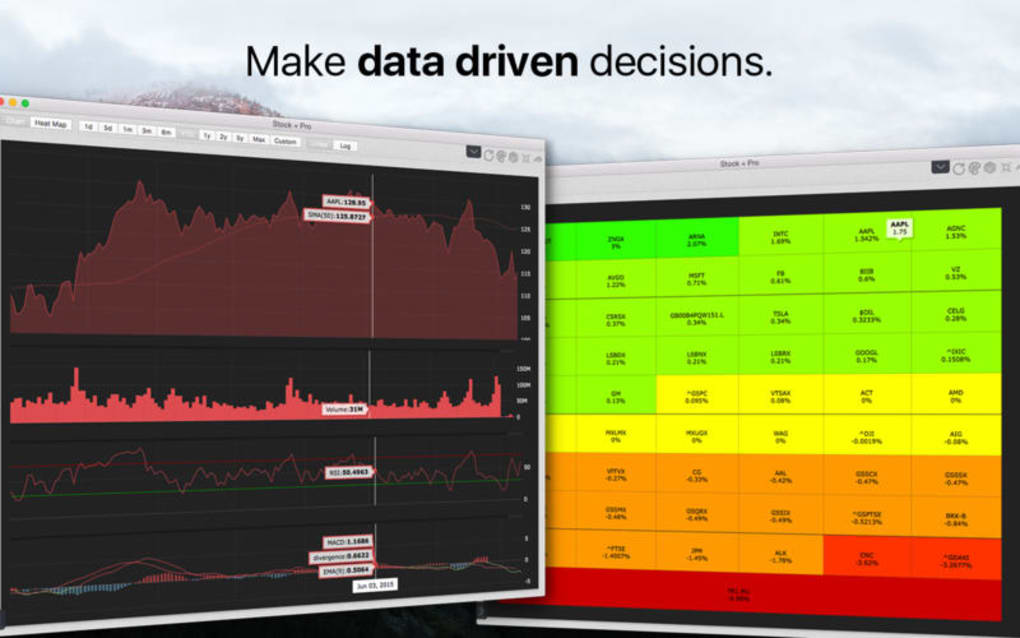
- Interactive price graphs that show intraday, weekly, and monthly trends.
- Pre‑set alarm system for price thresholds, percentage changes, and volume spikes.
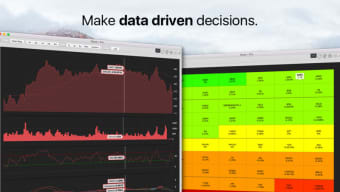
- Heat‑map visualizer that colors‑codes stocks based on relative performance.
- Integrated RSS news feed delivering concise financial headlines.
- Support for 170+ currencies, including automatic conversion.
- Lightweight footprint – consumes less than 30 MB RAM on launch.
- Secure HTTPS connections to all data providers.
- Automatic daily updates and optional manual refresh.
- Cross‑platform availability for Windows, macOS, Android, and iOS.
Installation & Usage Instructions
Getting Stock Pro up and running is intentionally straightforward, allowing even non‑technical users to start monitoring their investments within minutes. Follow these steps for a hassle‑free installation:
- Download the installer: Visit the official Stock Pro website and click the “Download for Windows/macOS/Android/iOS” button that matches your operating system. The file is digitally signed, ensuring a secure download.
- Run the installer: On Windows, double‑click the .exe file; macOS users will open the .dmg and drag the app to the Applications folder. Mobile users simply tap the .apk (Android) or .ipa (iOS) and follow the on‑screen prompts.
- Grant permissions: Stock Pro requires access to the network and, on macOS, permission to display items in the menu bar. Accept these prompts to enable real‑time data streaming.
- Configure your watchlist: Upon first launch, the setup wizard invites you to import symbols from a CSV file, connect your brokerage API, or manually type ticker symbols. You can create multiple watchlists (e.g., “Tech”, “Dividend”, “Crypto‑ETF”) and assign distinct colors.
- Set up alerts: Navigate to the “Alarms” tab, choose a stock, and define trigger conditions such as “price above $150” or “daily change > 5 %”. Alerts appear as native OS notifications, ensuring you never miss a critical move.
- Explore the heat map: Activate the heat feature from the toolbar. Stocks that outperform their sector’s average gain turn green, while underperformers shade red. Hover over any ticker to see a quick‑view chart.
- Read the news feed: The bottom section of the ticker pane displays headlines sourced from reputable financial outlets. Click a headline to open the full article in your default browser.
- Fine‑tune preferences: In Settings, adjust refresh intervals (default 60 seconds), toggle currency conversion, and choose between light or dark UI themes.
- Stay updated: Stock Pro checks for updates nightly. When a new version is available, a discreet prompt appears; you can install with a single click, preserving all your watchlists and alarms.
The user experience is designed for speed: the ticker scrolls smoothly, graphs load instantly, and alerts fire without delay. If you encounter any issues, the built‑in Help Center offers step‑by‑step guides and a searchable knowledge base. For more complex problems, the support team can be reached via email or live chat, with response times under two hours for paid users.
Compatibility, Pros & Cons
Stock Pro runs on the latest versions of Windows 10/11, macOS 12 Monterey and later, Android 9+, and iOS 13+. The application leverages native UI frameworks on each platform, ensuring consistent performance and visual fidelity across devices.
Pros
- Real‑time data with sub‑second latency.
- Highly customizable watchlists and alert rules.
- Heat‑map visualization simplifies portfolio analysis.
- Integrated news feed reduces the need for multiple apps.
- Low system resource consumption makes it ideal for older machines.
- Multi‑currency support removes conversion friction for international investors.
- Secure connections and regular security patches.
Cons
- Free tier limits the number of active alerts to three.
- Advanced charting (e.g., technical indicators) is only available in the premium version.
- Mobile UI is slightly less feature‑rich than the desktop counterpart.
- No built‑in order execution; the app is purely informational.
After a month of daily use, Stock Pro proved to be an indispensable companion for my trading routine. The heat‑map instantly highlighted breakout stocks, while the alarm system caught a 7 % surge in a biotech ETF that I would have otherwise missed. The only drawback was the three‑alert limit in the free plan, which nudged me toward the modestly priced premium tier. Overall, the blend of speed, visual clarity, and cross‑platform availability earns it a solid 4.5 out of 5 stars.
Frequently Asked Questions
Can Stock Pro pull data from my brokerage account?
Yes. Stock Pro integrates with most major broker APIs (e.g., Interactive Brokers, TD Ameritrade, Robinhood). You can securely link your account using OAuth, allowing the app to display real‑time positions without storing credentials on our servers.
Is my data encrypted?
All data transmissions between Stock Pro and financial data providers use TLS 1.3 encryption. Personal settings and watchlists are stored locally on your device and are optionally backed up to an encrypted cloud vault.
How often does the ticker refresh?
The default refresh interval is 60 seconds, but you can adjust it between 5 seconds and 5 minutes in Settings. Premium users receive a priority data feed that updates every 2 seconds during market hours.
Can I use Stock Pro on multiple devices with the same account?
Absolutely. By signing into your Stock Pro account, your watchlists, alerts, and preferences sync across all registered devices, ensuring a consistent experience on desktop, tablet, or phone.
Is there a free version, and what are its limitations?
Yes, Stock Pro offers a free tier that includes the basic ticker, heat map, and up to three custom alerts. Advanced charting tools, unlimited alerts, and premium news sources require a paid subscription starting at $4.99 per month.
Conclusion & Call to Action
In a world where every second counts, Stock Pro delivers a powerful combination of real‑time data, intuitive visual cues, and seamless cross‑platform accessibility. Its interactive ticker keeps your portfolio front‑and‑center, while the heat‑map and alert system ensure you never miss a market move. Though the free version imposes modest limits, the premium upgrade is priced competitively and unlocks features that serious traders will appreciate. If you’re looking for a secure, lightweight tool that consolidates price quotes, news, and performance analytics into a single, unobtrusive menu‑bar widget, Stock Pro is worth the download.
Download Stock Pro now and start monitoring your investments with confidence. Enjoy a 14‑day free trial of the premium plan, and experience the difference that an interactive, heat‑driven ticker can make to your trading workflow.







